Remove this Banner Ad

PC Pc Gaming/building thread

  • Thread starter Thread starter TheKanga
  • Start date Start date
  • Tagged users Tagged users None

🥰 Love BigFooty? Join now for free.

I know the Predator you are talking about. That was my first preference because of the price. Image quality wise every review I read couldn't split the two. The final deciding factor for me was pretty pedantic but I read many reviews where the monitor itself is a bit unstable. When I checked it out myself it wasn't as bad as some people made out but it did wobble a little (maybe this changes from monitor to monitor) where as the ROG Swift is sturdy as a rock. The other thing was even more trivial and that was the OSD. I found the Predator OSD a bit laggy and unintuitive to navigate compared to the Swift which was fast and snappy and really easy with the little joystick on the back of the panel. Most people just set it once and forget so this is just nit picking but when I was going to drop a grand on a monitor I just felt IMO the ROG Swift was a better build quality. Not that there was anything wrong with the Predator, I just felt more comfortable with the Swift in the end.

Build is good. My only two cents would be to up the PSU from 650w to 750w just for extra headroom and it doesn't really cost much more. I'm not sure what the availability on the 8700k is at the moment. I got mine on launch day and the shop told me I got one of only two they could get in and stock will be tight until about Christmas.

The build quality of the ASUS is definitely terrific both from an aesthetic and sturdiness viewpoint. Was very impressed with that. I did see about the OSD for the Acer was pretty rubbish if you wanted to change the settings. I'll look into that a bit more as I generally run 2 different setting modes on my monitor at the moment, one for gaming and one for just general use which lowers the blue light down. At the end of the day if I'm dropping a stack of money on a monitor I'd be wanting something I'm very happy with for the next few years.

Yeah I initially had a 750W power supply in but cut it down to save a little on the cost. Probably not the worst thing to bump it up to 750W just to make sure it runs nicely.
 
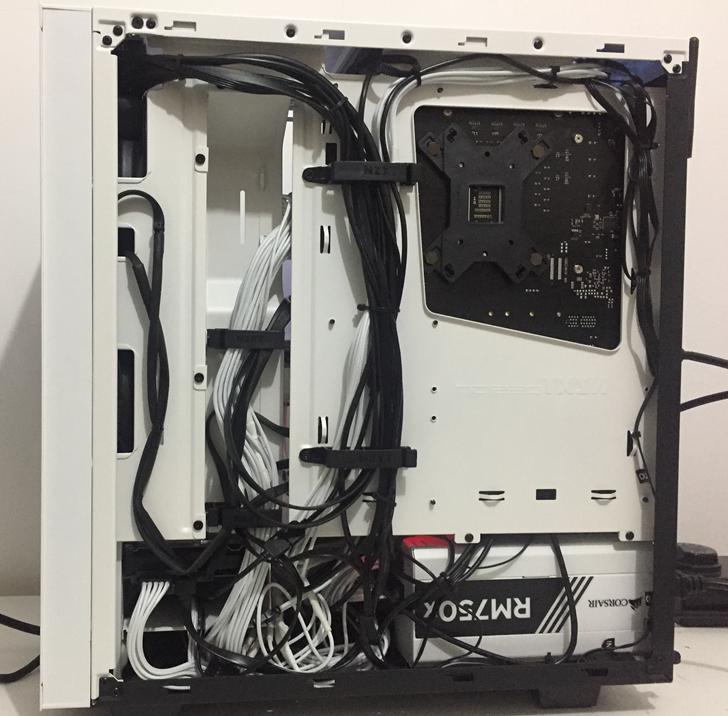
The other side isn't as pretty. So many cables and so little room!


IA0cDqz.png
Yeah mine's similar. It's honestly not too bad, I've just got some cords in between the front fans and the GPU. I have a couple really thick ones that are just impossible to budge unfortunately.
 

Log in to remove this Banner Ad

I really like the look of the Fractal Design Define C with the tempered glass for a case - https://www.pccasegear.com/products/39947/fractal-design-define-c-tg-case

However it seems like it's got really limited options for AIO cooling in it. Am I correct in saying that with a Corsair H100i v2 AIO cooler you could only have a graphics card less than 285mm in length? That's given 315mm GPU clearance with fans at the front, then with the radiator being 30mm. GTX 1080 are pretty much all right around 285mm which means no clearance.

Then if you went with a top mounted setup which seems to be worse for CPU temperatures it seems very tight with max component height on the MB being 40mm.

Not sure if anyone has any advice on this front. I prefer the look of the Define C however the NZXT S340 Elite definitely seems easier to build in.
 
0/10
Apple Mac in the background :thumbsdown:
Gotta figure out what to do with the bloody thing now. :P Was gonna try using it as a second monitor but knowing Apple, fat chance that's possible.
 
I really like the look of the Fractal Design Define C with the tempered glass for a case - https://www.pccasegear.com/products/39947/fractal-design-define-c-tg-case

However it seems like it's got really limited options for AIO cooling in it. Am I correct in saying that with a Corsair H100i v2 AIO cooler you could only have a graphics card less than 285mm in length? That's given 315mm GPU clearance with fans at the front, then with the radiator being 30mm. GTX 1080 are pretty much all right around 285mm which means no clearance.

Then if you went with a top mounted setup which seems to be worse for CPU temperatures it seems very tight with max component height on the MB being 40mm.

Not sure if anyone has any advice on this front. I prefer the look of the Define C however the NZXT S340 Elite definitely seems easier to build in.

Any love for the Define S? No personal experience sorry but if there were any issues fitting a radiator at the front of the C you wouldn’t have any in the S. Without doing the measurements you could probably fit the rad at the front but you just wouldn’t be able to do a push/pull setup. Had a quick look and the MSI 1080 is listed as 279mm if that helps.

As for top mount that is always an issue on thin cases. You should still be able to find low clearance RAM but that’s always a bummer to compromise when looks are as important as performance when building :p. Another option is to find a mobo with the RAM slots placed a bit lower. I insisted on mounting my h100i at the top and the top of Trident Z RGB sticks actually clear the bottom of the rad fans, but I’m not sure if my mobo (Asus Maximus X Hero) has the RAM slots placed slightly lower, however I reckon the massive heat spreaders on the Corsair Vengeance sticks for example would hit. You wouldn’t have this issue what so ever with the S340 though of course but you would be limited to mounting the 240mm rad to the front but you want to do that anyway. S340 is an awesome case.

As for top vs front mounted radiator as long as you have good air flow it doesn’t matter too much. Front mounted definitely cools the CPU better and is probably better for overclocks but then you’re dumping that air straight onto the graphics card. Remember an air cooler is only using the air inside the case and that’s no different to using that same air to push up through a radiator as long as you have good flow through the case. I’ve only had my new build for a week so I’m still testing stuff but after an hour of Shadow of War last night my 8700k hit low 70s and idles low 30s with a top mounted h100i. However I’m not sure if this will be an issue if/when I decide to overclock it.
 
Any love for the Define S? No personal experience sorry but if there were any issues fitting a radiator at the front of the C you wouldn’t have any in the S. Without doing the measurements you could probably fit the rad at the front but you just wouldn’t be able to do a push/pull setup. Had a quick look and the MSI 1080 is listed as 279mm if that helps.

As for top mount that is always an issue on thin cases. You should still be able to find low clearance RAM but that’s always a bummer to compromise when looks are as important as performance when building :p. Another option is to find a mobo with the RAM slots placed a bit lower. I insisted on mounting my h100i at the top and the top of Trident Z RGB sticks actually clear the bottom of the rad fans, but I’m not sure if my mobo (Asus Maximus X Hero) has the RAM slots placed slightly lower, however I reckon the massive heat spreaders on the Corsair Vengeance sticks for example would hit. You wouldn’t have this issue what so ever with the S340 though of course but you would be limited to mounting the 240mm rad to the front but you want to do that anyway. S340 is an awesome case.

As for top vs front mounted radiator as long as you have good air flow it doesn’t matter too much. Front mounted definitely cools the CPU better and is probably better for overclocks but then you’re dumping that air straight onto the graphics card. Remember an air cooler is only using the air inside the case and that’s no different to using that same air to push up through a radiator as long as you have good flow through the case. I’ve only had my new build for a week so I’m still testing stuff but after an hour of Shadow of War last night my 8700k hit low 70s and idles low 30s with a top mounted h100i. However I’m not sure if this will be an issue if/when I decide to overclock it.

Don't mind the Define S but the lack of power shroud turns me off that one a bit. Just like my cases with them on there.

Yeah I'm just concerned at how close it is to the GPU at the front and think it might heat up the GPU a bit too much with only a 6mm clearance hence why I'm leaning more towards the S340 just to give me that extra room. It's a great case anyway like you said. I could still go for the Define C if I top mount, would just get the lower ram where I could. I'll look into it a little more. I'm not opposed to top mounting just concerned about the temps if I decide to overclock which I'm more than likely going to do to be fair.

What 1080ti did you buy for your build? I was looking at the Gigabyte Aorus at the moment. Seems very good and one of the cheaper ones.
 
have a define s. top mounted 360mm radiator. case will fit just about anything, but yeah, my PSU is right there. i guess you might find some better looking PSU's if necessary but there may be some compromises for that. otherwise someone somewhere will be making them no doubt (making shrouds, that is).
very roomy case, pretty much an empty shell. no hdd cages, or optical drive space (i use an external blu-ray drive). space for hdd, and ssd's on MB side of case, if you're not rolling with m.2.
 
Last edited:
Don't mind the Define S but the lack of power shroud turns me off that one a bit. Just like my cases with them on there.

Yeah I'm just concerned at how close it is to the GPU at the front and think it might heat up the GPU a bit too much with only a 6mm clearance hence why I'm leaning more towards the S340 just to give me that extra room. It's a great case anyway like you said. I could still go for the Define C if I top mount, would just get the lower ram where I could. I'll look into it a little more. I'm not opposed to top mounting just concerned about the temps if I decide to overclock which I'm more than likely going to do to be fair.

What 1080ti did you buy for your build? I was looking at the Gigabyte Aorus at the moment. Seems very good and one of the cheaper ones.

I didn’t notice the S didn’t have a PSU shroud, can see how that’s definitely a deal breaker! There are some really nice S340 builds though. Dan and E92 just completed theirs in this thread on the previous page. If you really don’t want to top mount your rad then imo not worth compromising other aspects of the build like RAM selection when you’re not going to be happy with it. I still think you will be able to front mount a rad in the Define C with a full length GPU, just not in a push/pull config. Probably a tight squeeze but I would be surprised if they didn’t keep this in mind when designing the case. I had a long week of work/overtime and crashed on the lounge as soon as I got home so didn’t get a chance to look at anything but I’ll have another look at dimensions tomorrow. As I’m only fresh off a new build myself a lot of this stuff is still at the front of my mind so won’t be a problem to look up.

I went with MSI Gaming X 1080ti. Really couldn’t split them all, similar clocks and cooling. Firstly looked at the Gigabyte Gaming and Aorus because they were among the cheapest even by only a few dollars. Ended up going the MSI due to middle ground, the Twin Frozr fans getting good reviews and I’ve had enough MSI products in the past to trust it (upgraded from MSI 980 and Gaming 3 Z97 mobo).

I didn’t really plan on a whole new build at the time though, it sort of just happened and if I had the choice all over again I would have shelled over the extra $50 for the ROG Strix just so the lighting can match up with my motherboard and RAM lol. I had been just slightly upgrading my old system over time but the 1080ti got bottle necked hard by my old CPU and then decided that’s what I would do. My full build in a Corsair 570x is only a page or two back in the thread :thumbsu:
 

Remove this Banner Ad

Anyone have any idea when the next shipment of Coffee Lake CPUs is for Australia? Want to jump on as soon as someone has stock of them.
 
Anyone have any idea when the next shipment of Coffee Lake CPUs is for Australia? Want to jump on as soon as someone has stock of them.

Saw the question asked on PCCG's Facebook and they said they will get continual shipments over the weeks until Christmas. They didn't say how many or what models. However when I got my 8700K from Scorptec they said it was one of only two they received (and one of only 40 that came to Australia) and don't think they are getting any more until about Christmas either. They just sound like guesstimates to me but I've been looking around the net and stock does seem pretty low world wide. I guess the best thing to do is to just keep an eye on all the stores. I would have suggested getting the Z370 mobo you wanted first in the case you finally get your hands on a CPU but the mobo you want is gone, but some places like Scorptec had a rule in place just recently that you couldn't buy a coffee lake without a compatible board at the same time.
 

🥰 Love BigFooty? Join now for free.

Saw the question asked on PCCG's Facebook and they said they will get continual shipments over the weeks until Christmas. They didn't say how many or what models. However when I got my 8700K from Scorptec they said it was one of only two they received (and one of only 40 that came to Australia) and don't think they are getting any more until about Christmas either. They just sound like guesstimates to me but I've been looking around the net and stock does seem pretty low world wide. I guess the best thing to do is to just keep an eye on all the stores. I would have suggested getting the Z370 mobo you wanted first in the case you finally get your hands on a CPU but the mobo you want is gone, but some places like Scorptec had a rule in place just recently that you couldn't buy a coffee lake without a compatible board at the same time.

I'll keep checking the main websites continually but it seems like there will be a decent shortage for a while yet. Know some people in the US are saying that within a month there should be a decent amount of supply for the 8th Gen. Hopefully that will translate to some more stock over here. Worst comes to worst I could always order from America and just cop the shipping costs if they aren't too high.
 
dwwaino Dannnnnnnnnn

Have either of you guys so far had any significant backlight bleed or any quality problems with your Asus ROG Swifts? Reading up online there has been plenty of talk about it, some say there is a lot, some say there isn't much. Spending $1100 on a monitor you'd expect it to be nigh on perfect.
 
Fair enough, pretty much what most people are reporting if anything for the monitor. Still thinking it over but really do like the look of the Asus.
 

Remove this Banner Ad

Remove this Banner Ad

🥰 Love BigFooty? Join now for free.

Back
Top Bottom