Remove this Banner Ad

PC Pc Gaming/building thread

  • Thread starter Thread starter TheKanga
  • Start date Start date
  • Tagged users Tagged users None

🥰 Love BigFooty? Join now for free.

Just got my FTTP upgrade today. Pretty decent at 6pm when it's the 250 tier. Didn't go 1000 because with Telstra it's just too expensive at the moment. Considered some other options like Aussie but as the missus works from home and relies on the internet so I didn't want to risk unreliable service when Telstra have been rock solid. I think I read last year that NBN will be shuffling the tiers this year or next anyway so I'm assuming the 250 tier will get bumped to 400 or 500. 3ms ping is tidy too. On my previous FTTC connection my best ping was usually 6 or 7.


View attachment 2254683

edit: just downloading Alan Wake 2 again and that has translated to about 33mb sec woo
What was involved in the upgrade? I've got FTTN, but I'm the closest house to the node which has given me an incredibly stable and consistent 100mbps/40mbps which is fine for what I use it for. I have been thinking about upgrading to FTTH, while the upgrade is free.

Do people need to come into the house for the installation? I'm guessing they'd need access into the roof cavity to run the wires to the modem?
 
What was involved in the upgrade? I've got FTTN, but I'm the closest house to the node which has given me an incredibly stable and consistent 100mbps/40mbps which is fine for what I use it for. I have been thinking about upgrading to FTTH, while the upgrade is free.

Do people need to come into the house for the installation? I'm guessing they'd need access into the roof cavity to run the wires to the modem?

They will run fibre from the node to your house where they install a new NTD. The actual installation will depend on your house by as they run a completely new line from the node they may not have to dig through any roofs or walls. My node was at the end of my driveway so I had consistent and maxed FTTC speeds and it was fine for me too until it just wasn't anymore (for example if I was downloading something and the wife was streaming something 4K it would interfere with her stream).

They will generally only install the NTD at some point that's easy at the front of your house which is why it's so common to see them installed in people's garages. Rather than a loose modem looking NTD they'll actually install a physical box on the wall for FTTP (there is a modem inside but they case them in fancy boxes now I guess to discourage people from taking them when they move). If you want it elsewhere you have to pay or get a data guy to come out and do it. I'm the middle house on a subdivided lot so it was easy. My house faces the driveway that runs down the length of the lot and the NBN trench runs right past my house to head to the neighbour at the back. I have a separate gaming room that faces the front so he was just able to feed it straight inside my room. From there you just plug in your existing router and you're good to go.
 
Can't remember if I shared this, was meaning to.

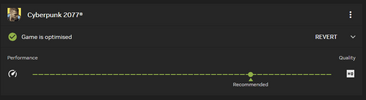
So my new PC is pretty good: 9800x3d, RTX 5080, 32GB RAM, 1440p monitor. It's a high-end machine and I am loving it so far. Installed Cyberpunk and using the default NVIDIA optimisations in the app, I get this:

1747436133621.png

What sort of unholy beast of a machine do you need to max this bad boy out? My physical games are in alphabetical order on my shelf, it worked out nicely that Crysis and Cyberpunk are next to each other!

Haven't yet optimised Dark Ages, which is the newest game I own, but needless to say both 2016 and Eternal are maxxed out as you would expect. Looking forward to seeing what Stalker 2 defaults to as well, but waiting for a lot more patches before I dive in there.
 
Can't remember if I shared this, was meaning to.

So my new PC is pretty good: 9800x3d, RTX 5080, 32GB RAM, 1440p monitor. It's a high-end machine and I am loving it so far. Installed Cyberpunk and using the default NVIDIA optimisations in the app, I get this:

View attachment 2316760

What sort of unholy beast of a machine do you need to max this bad boy out? My physical games are in alphabetical order on my shelf, it worked out nicely that Crysis and Cyberpunk are next to each other!

Haven't yet optimised Dark Ages, which is the newest game I own, but needless to say both 2016 and Eternal are maxxed out as you would expect. Looking forward to seeing what Stalker 2 defaults to as well, but waiting for a lot more patches before I dive in there.

Cyberpunk is constantly getting the latest NVIDIA tech bolted onto it which usually takes the latest flagship to max out especially with high ray tracing and path tracing. I actually haven't tried it on my new system but I'm planning to just to see how it runs. It's similar to yours except a 7800x3d and 4K monitor.

Haven't tried Stalker 2 on it either but that was actually holding pretty solid on my previous 4080 in ultrawide. I'm currently playing Doom Dark Ages and it's a weird one because it doesn't scale with settings properly. I let the game itself detect as a baseline which was High preset (different settings hardly affect fidelity anyway) with DLSS Quality and 2x frame gen which sticks to a pretty solid 120-140 but never dips below 120 so it is holding 60+ internally. At 1440p you'll get a bit more performance out of it than me. Just make sure to manually override the DLSS model in the NVIDIA app to "latest".
 

Log in to remove this Banner Ad

Due to controller talk and looking some up I kept getting recommendations on YouTube and Amazon. Scored the Gamesir Cyclone 2 with charging stand for $70 with discounts applied at checkout. My only reservation is it might feel cheap but of the box feels the same as a standard Series X controller. It has HE sticks and microswitch buttons so if they don't wear out as quickly then it's probably the best sub $100 purchase and would even make it hard to justify any of the more expensive premium options. Usually I remove paddle buttons because I don't use them and accidentally hit them but the two on this one as actual buttons on the back feels less intrusive could actually be beneficial if I got back into anything like Rocket League.
 
Can't remember if I shared this, was meaning to.

So my new PC is pretty good: 9800x3d, RTX 5080, 32GB RAM, 1440p monitor. It's a high-end machine and I am loving it so far. Installed Cyberpunk and using the default NVIDIA optimisations in the app, I get this:

View attachment 2316760

What sort of unholy beast of a machine do you need to max this bad boy out? My physical games are in alphabetical order on my shelf, it worked out nicely that Crysis and Cyberpunk are next to each other!

Haven't yet optimised Dark Ages, which is the newest game I own, but needless to say both 2016 and Eternal are maxxed out as you would expect. Looking forward to seeing what Stalker 2 defaults to as well, but waiting for a lot more patches before I dive in there.

9800x3d, rtx5080 and 64gb 6000mhz RAM in mine. 1440p

i'm about 75 hours into Cyberpunk now. been running with every single setting maxed including Path Tracing on, DLSS transformer model (quality) and average like 70-80fps in main game and a little lower in Dogtown (expansion pack area). dips into 50's in like 2-3 particular locations in Dogtown. I think the 1% lows must be good with the 9800x3d because the FPS feels great everywhere aside from the very first part of Dogtown (an area you spend 5 mins in). could use the frame gen to get more but I feel it looks incredible and runs well enough now
 
Due to controller talk and looking some up I kept getting recommendations on YouTube and Amazon. Scored the Gamesir Cyclone 2 with charging stand for $70 with discounts applied at checkout. My only reservation is it might feel cheap but of the box feels the same as a standard Series X controller. It has HE sticks and microswitch buttons so if they don't wear out as quickly then it's probably the best sub $100 purchase and would even make it hard to justify any of the more expensive premium options. Usually I remove paddle buttons because I don't use them and accidentally hit them but the two on this one as actual buttons on the back feels less intrusive could actually be beneficial if I got back into anything like Rocket League.
Since I only really use controllers for racing games I grabbed Eswap XR Pro Controller Forza Horizon 5 Edition when they were on special
1747639140946.png

Bloody weird device but it's actually fairly good once you get used to it, directional controls are all modular
 
Since I only really use controllers for racing games I grabbed Eswap XR Pro Controller Forza Horizon 5 Edition when they were on special
View attachment 2319260

Bloody weird device but it's actually fairly good once you get used to it, directional controls are all modular

I always see these around. Is that like an actual little steering wheel or just a fancy stick or something?
 
It's an actual wheel, has about 90 degrees movement, and auto-centres
Is it hard getting used to with it being on the same side as the accelerator trigger? I'd have to give it a go but it feels like the right hand would be doing a lot (yeah yeah, let's not go there :tearsofjoy:).
 
Is it hard getting used to with it being on the same side as the accelerator trigger? I'd have to give it a go but it feels like the right hand would be doing a lot (yeah yeah, let's not go there :tearsofjoy:).
The directional controls are all modular so you can shift them where ever you want. I've got the wheel in the bottom left slot (where the D-pad is in the photo), D-pad top left, and stick on the bottom right.
 

Remove this Banner Ad

This is the NBN tier upgrades I mentioned previously and partly why I opted for Telstra's Ultimate 250 plan. I knew they were shifting, I thought my tier was going to to 500 but according to this it's 750 and for the same price starting September. Meanwhile their Ultrafast 1000 is only getting a greater upload provision and I think that's because I read elsewhere that NBN are introducing a 2000 tier starting October. I negotiated a discount when I upgraded to FTTP as Telstra were much more expensive than anyone else but with these new tiers I could even shift back down to pay what I was previously and still be on 500.

These are dictated by NBN so anyone else on FTTP should check with their ISP to see what their new speeds will be. This may also entice more on FTTC/FTTN to take up the upgrade.


Screenshot_20250521_125805_Chrome.jpg
 
This is the NBN tier upgrades I mentioned previously and partly why I opted for Telstra's Ultimate 250 plan. I knew they were shifting, I thought my tier was going to to 500 but according to this it's 750 and for the same price starting September. Meanwhile their Ultrafast 1000 is only getting a greater upload provision and I think that's because I read elsewhere that NBN are introducing a 2000 tier starting October. I negotiated a discount when I upgraded to FTTP as Telstra were much more expensive than anyone else but with these new tiers I could even shift back down to pay what I was previously and still be on 500.

These are dictated by NBN so anyone else on FTTP should check with their ISP to see what their new speeds will be. This may also entice more on FTTC/FTTN to take up the upgrade.


View attachment 2320859

The days of being on 20 down 5 up seem like yesterday, but it was more like 15 years ago!!

Have enjoyed the constantly uplifts in both gb quotas (set limits to unlimited) and speeds!! Without a major price increase.
 
Application submitted for FTTP upgrade in October and still no onsite visit from NBN....

images


Plus the application had to have Body Corp details who are equally useless, so can't follow up directly.

Can't wait till we can afford to sell our shitty unit and upgrade to a house/non body corp property.
 
Application submitted for FTTP upgrade in October and still no onsite visit from NBN....

images


Plus the application had to have Body Corp details who are equally useless, so can't follow up directly.

Can't wait till we can afford to sell our shitty unit and upgrade to a house/non body corp property.
That sucks - took about a week for mine to get done around 12 months ago.
 
Application submitted for FTTP upgrade in October and still no onsite visit from NBN....

images


Plus the application had to have Body Corp details who are equally useless, so can't follow up directly.

Can't wait till we can afford to sell our shitty unit and upgrade to a house/non body corp property.

As in October last year? 🧐 Gee whiz, something really up there. Like above, Telstra booked NBN to come around only one week after I requested the upgrade.

Also how come body corp got involved, what sort of unit? My lot doesn't have a body corp but even if it did I'm not sure why they'd be involved when all NBN were doing were dragging a new line underground where the existing line was.
 
As in October last year? 🧐 Gee whiz, something really up there. Like above, Telstra booked NBN to come around only one week after I requested the upgrade.

Also how come body corp got involved, what sort of unit? My lot doesn't have a body corp but even if it did I'm not sure why they'd be involved when all NBN were doing were dragging a new line underground where the existing line was.

Yep October last year.

On a lot of 5. We used to be self managed when we first bought it, but one of the existing owners who owned a couple wanted to palm a lot of shit onto us and we weren't having it, so ended up doing the only amicable thing by having a owners corp manager.
 

🥰 Love BigFooty? Join now for free.

Yep October last year.

On a lot of 5. We used to be self managed when we first bought it, but one of the existing owners who owned a couple wanted to palm a lot of shit onto us and we weren't having it, so ended up doing the only amicable thing by having a owners corp manager.

Damn. We're on a lot of 3 that's self managed and had and issue a couple years ago that I wished we had body corp. Thankfully that got sorted as they were selling and I think they realised we could have made it very difficult for them.

Anyway, how is your current net connected? Do you have a communications ditch or something and then a physical box attached to your wall with the line coming from underground? I'm asking because each house on the lot should have it's own line connected to a node on the street. The upgrade shouldn't affect the other homes or the common property. How did you do submit the upgrade as well? If it was directly through NBN then I assume it wasn't apart of the free upgrade? Otherwise if you didn't I'd just go directly through your ISP if you are eligible for the free upgrade as it's none of the other owners or the body corp's business since you aren't affecting them.
 
Anyway, how is your current net connected? Do you have a communications ditch or something and then a physical box attached to your wall with the line coming from underground? I'm asking because each house on the lot should have it's own line connected to a node on the street. The upgrade shouldn't affect the other homes or the common property. How did you do submit the upgrade as well? If it was directly through NBN then I assume it wasn't apart of the free upgrade? Otherwise if you didn't I'd just go directly through your ISP if you are eligible for the free upgrade as it's none of the other owners or the body corp's business since you aren't affecting them.

I'm clueless with all that stuff mate. House is about 50 years old. My folks moved up our way (in a much newer and nice area lol) they have what I think is a HFC box? We don't have one of those, so have no idea.

Can't get the free upgrade through Aussie BB either, so had to do the application directly.

Ironically after pushing our corp manager the past week, finally got an update with NBN, sounds like our application was stuck in some sort of admin purgatory looking at the email trail.

Things back in motion so hopefully getting a site visit in the next couple of weeks now. Just hoping the quote isn't revised to be something much higher.
 
I'm clueless with all that stuff mate. House is about 50 years old. My folks moved up our way (in a much newer and nice area lol) they have what I think is a HFC box? We don't have one of those, so have no idea.

Can't get the free upgrade through Aussie BB either, so had to do the application directly.

Ironically after pushing our corp manager the past week, finally got an update with NBN, sounds like our application was stuck in some sort of admin purgatory looking at the email trail.

Things back in motion so hopefully getting a site visit in the next couple of weeks now. Just hoping the quote isn't revised to be something much higher.

About the same age as mine so I'm sure you're dealing with the same 50 year old house issues as me lol.

What's your current connection type? The only reason I can think of that it's not eligible for the free upgrade at the moment is that maybe you're on HFC/cable? Unless you're just unlucky and in one of the few areas that still aren't included yet. FTTC and FTTN are going to be eventually phased out which is why they're offering the upgrades. Anyway regardless of your connection type you will have a physical line coming from the street somewhere to your house. I'm 99% certain you'll have a communications trench somewhere on your lot and there will be an individual line for each house in there unless you've got overhead wires but I don't think that happens on divided lots. In my instance they just locate where my line terminates in the street, tied the new line to it then from where it attaches to my house just simply drag the line to pull it through and fit it to the new NTD. Job done.

If you're curious it might show on a Dial Before You Dig which is free. They don't always show internal connections but you never know. I did one recently for my lot looking for a water main (yeah, 50 year old house issues) which unfortunately didn't show me what I was looking for but I was also provided with an NBN overlay which showed the communications line.
 
About the same age as mine so I'm sure you're dealing with the same 50 year old house issues as me lol.

What's your current connection type? The only reason I can think of that it's not eligible for the free upgrade at the moment is that maybe you're on HFC/cable? Unless you're just unlucky and in one of the few areas that still aren't included yet. FTTC and FTTN are going to be eventually phased out which is why they're offering the upgrades. Anyway regardless of your connection type you will have a physical line coming from the street somewhere to your house. I'm 99% certain you'll have a communications trench somewhere on your lot and there will be an individual line for each house in there unless you've got overhead wires but I don't think that happens on divided lots. In my instance they just locate where my line terminates in the street, tied the new line to it then from where it attaches to my house just simply drag the line to pull it through and fit it to the new NTD. Job done.

If you're curious it might show on a Dial Before You Dig which is free. They don't always show internal connections but you never know. I did one recently for my lot looking for a water main (yeah, 50 year old house issues) which unfortunately didn't show me what I was looking for but I was also provided with an NBN overlay which showed the communications line.

On FTTN. Tried looking for the free DBYD, but I'm blind and couldn't see anything.
 
So as prices start to fall they plan on restricting supply again?

AMD really need to swing big next time.


Are AMD sticking to what they said and exiting the high end GPU market? I feel like there is a huge market for high end cards that NVIDIA aren't capitalising on and I get the feeling that if AMD put out a competitive product they have a chance to take a bit of the NVIDIA user base.
 

Remove this Banner Ad

Remove this Banner Ad

🥰 Love BigFooty? Join now for free.

Back
Top Bottom