


X_box_X
VFL is taking over.
 Veteran
 10k Posts
 Western Bulldogs - Ed Richards Player Sponsor 2018
 Western Bulldogs - Bailey Dale Player Sponsor 2018
 Western Bulldogs - Mitch Honeychurch Player Sponsor 2018
 Western Bulldogs - Nathan Mullenger-McHugh Player Sponsor 2018
 Western Bulldogs - Nathan Mullenger-McHugh Player Sponsor 2017
 Western Bulldogs - Bailey Dale Player Sponsor 2017
- Joined
- Mar 15, 2001
- Posts
- 26,835
- Reaction score
- 65,500
- Location
- Whitten Oval
- AFL Club
- Western Bulldogs
- Other Teams
- Footscray, Chelsea
Instead of manually entering the order of dates throughout the year in descending cells, is there a code that allows you to click and drag that automatically enters chronological dates per day rather than per month?
I.e.
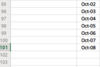
I have manually entered those dates. If I click and drag from cell 101 to cell 102, the 102 cell becomes Nov-08 instead of Oct-09.
Please help.
I.e.
I have manually entered those dates. If I click and drag from cell 101 to cell 102, the 102 cell becomes Nov-08 instead of Oct-09.
Please help.


