





Chief
~ Shmalpha ~


- Admin
- #1
Click this link to see all How To threads:
Suggestions, Feedback and Announcements
HELP: Help
The Help Page includes among other things...
Rules: Terms and rules
Smilies: Smilies (The smilie face button at the top of your post/edit window gives you access to all of these)
BB Codes: BB codes (These let you format your text in lots of cool ways)
Trophies: Trophies
Medals: https://www.bigfooty.com/forum/help/medals
NOTE: Some of these HowTo threads are based on VBulletin - our older forum software. Many will have changed. We will try to update them over time. Ask if anything doesn't make sense.
How to...
Alerts - manage my alerts and push notifications: How To - Watched threads, alerts and the Watch Console: The latest news.
Post a message: How To - How To Post
Change your user name: How To - Change your BigFooty Screen Name
Change your AFL club: Contact us with your request.
Reset your Password: Lost password
Change the Time: How To - How To Change the Time on BigFooty
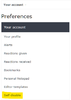
Delete your account: There is a "Self-disable" option in your preferences menu. Click your user name in the header -> Preferences -> Self-disable in the left-hand menu. You get a week to change your mind and cancel the self-disable process.
Link to threads, articles and websites: How To - How To Link To Articles/Websites
Pictures - How to link to them: How To - How To Post Pictures
YouTube Videos - How to post them: Just paste the link from YouTube into a post and the video will be embedded.
This also works with all the major social and video sites including Facebook, Twitter, Instagram, Vimeo, Vine, Veoh, DailyMotion etc.
Search the forum - It's fun and informative: How To - How To Do A Search
Quotes - How to split them up: How To - How To Split up a Quote
Polls - How to post one: How To - How To Post A Poll
Upgrade your account to Premium Gold or Platinum - https://www.bigfooty.com/forum/account/upgrades
Delete Cookies from your web browser (useful if the site keeps logging you out every time you go to a new page) - How To - Delete Cookies in your Web Browser
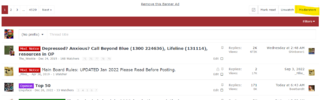
Find the mods of a board you are on: There is a button just above the thread list on the right of the screen.
Last edited:


