Remove this Banner Ad

PC Pc Gaming/building thread

  • Thread starter Thread starter TheKanga
  • Start date Start date
  • Tagged users Tagged users None

🥰 Love BigFooty? Join now for free.

I'm get where you're coming from.

What they do well is thorough hardware analysis especially many products at once.

The graphs for that stuff are great!

This is where they built their base from. They were good and one of the best resources. It's like the fame went to their heads and they (well Steve mostly from what I see) just turned into a condescending tool bag. They act like they're the authority on the subject and if you disagree then your comments will be screenshot and shared online for their twitter gang to pile on. Hardly a day went by when I wouldn't see him involved in some sort of shit fight on twitter that I finally had to stop following. He could have at least taken it to a private account so I didn't have to see it under HUB. I'll never forget his disingenuous reporting when they got momentarily black listed from NVIDIA yet I could find numerous tweets by him in only the days prior that he was trashing the brand at any chance. Now every video has really cringey thumbnails too. I know that's petty but for me it was the final straw.

Gamer's Nexus is heading the same way since they've tried going all 60 minutes with their door stopping and reporting. Super cringe to me. Just tell about the tech, man.
 
Have your tried clearing CMOS?

If you are running a 3700X shouldn't it be compatible with the clean factory BIOS?

List of supported CPUs at TUF GAMING X570-PLUS (WI-FI) - Review|Motherboards|ASUS Australia
Yep, the 3000 series CPUs and X570 boards launched together, you shouldn't need any updates unless RAM compatibility improved down the line.

EDIT: If you suspect RAM then the official compatibility list is here: https://dlcdnets.asus.com/pub/ASUS/...or_3rd_Gen_AMD_Ryzen_Processors_X570_0722.pdf

5 minutes on Google and it smells of a compatibility issue, these boards seemed to have a few but a BIOS update fixed it up. If it's still running an old BIOS that may be the issue. If you got it from a bricks and mortar store see if they're happy to throw some other RAM in there and update the BIOS, it may well be easier than the RMA process.
 
Last edited:
Yeah tried cmos reset too nothing.

A headscratcher for me.

I thought all the x570 boards had the ability to update the BIOS without a CPU though.

Very strange
 

Log in to remove this Banner Ad

This is where they built their base from. They were good and one of the best resources. It's like the fame went to their heads and they (well Steve mostly from what I see) just turned into a condescending tool bag. They act like they're the authority on the subject and if you disagree then your comments will be screenshot and shared online for their twitter gang to pile on. Hardly a day went by when I wouldn't see him involved in some sort of sh*t fight on twitter that I finally had to stop following. He could have at least taken it to a private account so I didn't have to see it under HUB. I'll never forget his disingenuous reporting when they got momentarily black listed from NVIDIA yet I could find numerous tweets by him in only the days prior that he was trashing the brand at any chance. Now every video has really cringey thumbnails too. I know that's petty but for me it was the final straw.

Gamer's Nexus is heading the same way since they've tried going all 60 minutes with their door stopping and reporting. Super cringe to me. Just tell about the tech, man.


I Know More Than You Season 4 GIF by Parks and Recreation
< - Me watching any GN "content".


but god I miss TomsHardware interactive chart for GPU and CPU.
 
Gamer's Nexus is heading the same way since they've tried going all 60 minutes with their door stopping and reporting. Super cringe to me. Just tell about the tech, man.

Was YouTube surfing the other day and saw GN's video on Neweggs RMA stuff with the Neweggs execs. Surely there isn't that many people out their keen to watch that stuff.
 
Jayztwocents is head and shoulders above the rest.

Others I enjoy are
Level 1 Tech (Wendell)
Dawyd Does Tech
Tech Yes City
Paul's Hardware
Greg Salazar
Kitguru
 
Jayztwocents is head and shoulders above the rest.

Others I enjoy are
Level 1 Tech (Wendell)
Dawyd Does Tech
Tech Yes City
Paul's Hardware
Greg Salazar
Kitguru

I like Jay but his content has declined in quality since he started chasing the algorithm when he complained about views going down. I like Paul's Hardware too.
 
Jayztwocents is head and shoulders above the rest.

Others I enjoy are
Level 1 Tech (Wendell)
Dawyd Does Tech
Tech Yes City
Paul's Hardware
Greg Salazar
Kitguru

Level1techs is where it's at

I also enjoy hairless Wendell and female Wendell.
 
The good news I got the display problem sorted, apparently something to do with the RAM. Dunno how since when I was trying it made sure to click every slot into place so I don't know if that was the issue or something else with it.

Bad news is I'm getting that "Your PC can't run windows 11" crap now, which is apparently plaguing a lot of users currently. Tried the TPM stuff in the bios which has worked for others but nothing.

Guess I should just try a fresh install of windows 10?
 

Remove this Banner Ad

The good news I got the display problem sorted, apparently something to do with the RAM. Dunno how since when I was trying it made sure to click every slot into place so I don't know if that was the issue or something else with it.

Bad news is I'm getting that "Your PC can't run windows 11" crap now, which is apparently plaguing a lot of users currently. Tried the TPM stuff in the bios which has worked for others but nothing.

Guess I should just try a fresh install of windows 10?

I would rather have TPM than not, what's the settings your using?
 
The good news I got the display problem sorted, apparently something to do with the RAM. Dunno how since when I was trying it made sure to click every slot into place so I don't know if that was the issue or something else with it.

Bad news is I'm getting that "Your PC can't run windows 11" crap now, which is apparently plaguing a lot of users currently. Tried the TPM stuff in the bios which has worked for others but nothing.

Guess I should just try a fresh install of windows 10?
Maybe install Win10 then when everything is up and running flash to latest BIOS then try a fresh install of Win11.
 
Honestly I'm not totally familiar with it. Browsed reddit and most seemed to say there was no performance difference, so I thought it was worth a try.

TPM is about security and encryption keys.

Here's a good rundown.


🥰 Love BigFooty? Join now for free.

Alright people so windows 10 was much more kind and worked beautifully so I'm up and running.

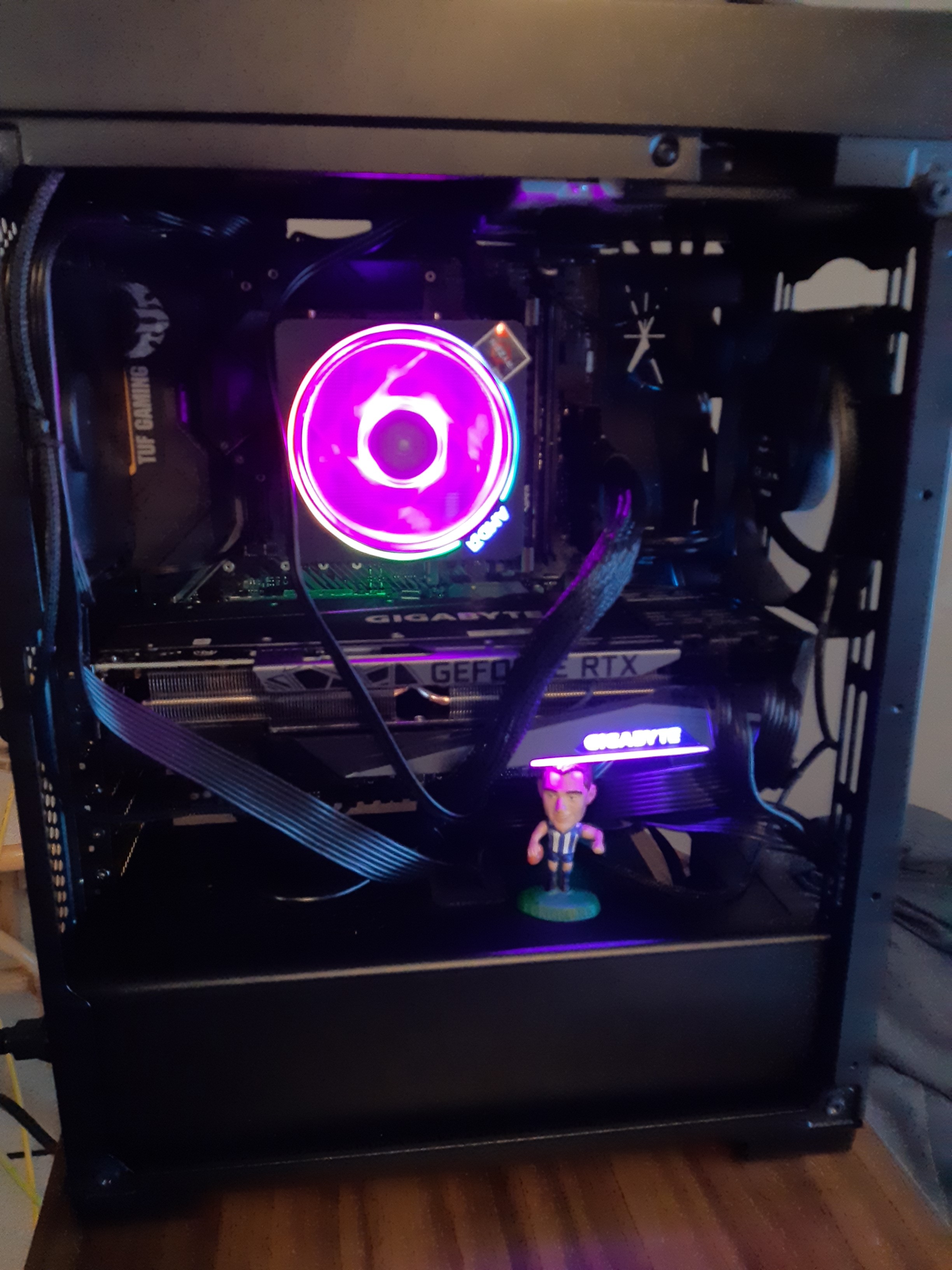
It's a rats nest I know, but was the only way I could really get it without twisting stuff too much or blocking fans more, especially if I had routed the main power through upper right. Would have liked another fan lower front but the big boy as you can see is blocking that. Aesthetics aren't a big thing for me though.

ZwtH37i.jpg


Last little while been have setting up gsync and other control panel graphic settings. Capped the FPS to 117 on my 120hz tv is that about right? Or better to leave uncapped?

Got some driver updates in too not sure how much they are gonna help.

Horse holding his own too under the big boy. Cheaper than a bracket. Carey's head was slightly too big.

Probably won't bother upgrading to windows 11 for a while to be honest, even after I update the bios.

Ordered another 16gb stick earlier on so I'll have a pretty good system here.

I think I'll call her...Lucy.
 
Alright people so windows 10 was much more kind and worked beautifully so I'm up and running.

It's a rats nest I know, but was the only way I could really get it without twisting stuff too much or blocking fans more, especially if I had routed the main power through upper right. Would have liked another fan lower front but the big boy as you can see is blocking that. Aesthetics aren't a big thing for me though.

ZwtH37i.jpg


Last little while been have setting up gsync and other control panel graphic settings. Capped the FPS to 117 on my 120hz tv is that about right? Or better to leave uncapped?

Got some driver updates in too not sure how much they are gonna help.

Horse holding his own too under the big boy. Cheaper than a bracket. Carey's head was slightly too big.

Probably won't bother upgrading to windows 11 for a while to be honest, even after I update the bios.

Ordered another 16gb stick earlier on so I'll have a pretty good system here.

I think I'll call her...Lucy.

No option to run cabling behind?
 
Tried it, had to twist the head of the power and it blocked the fan more.
If you're concerned about the case fan it looks like you can slide it up and down on those rails, twisting the power cable isn't an issue unless it's so tight it's stressing the plug on the motherboard.

Ultimately it's more of an aesthetics thing, if it's working and you're happy with it then leave it as is. In this age of windows and RGB everything people are probably a little too concerned about their cabling.
 

Remove this Banner Ad

Remove this Banner Ad

🥰 Love BigFooty? Join now for free.

Back
Top Bottom