





Gibbsy
Moderator


- Moderator
- #1
This tutorial is now out of date.
Simply place the @ symbol in front of the users name and they will be tagged.
- Chief
Tagging users is a new feature of BigFooty. It is primarily used to aware a user of a particular post or thread. The tagged user then receives an 'alert' to notify them that they have been tagged.
To tag a user, type the '@' symbol and then, without any spaces, begin typing the name of the user you wish to tag. A drop-down list of names will appear below the '@' symbol, and the list will shorten as you type more letters. To finish the tag, click on the poster's name in the dropdown list (avatars are also helpful here to identify posters with similar names).
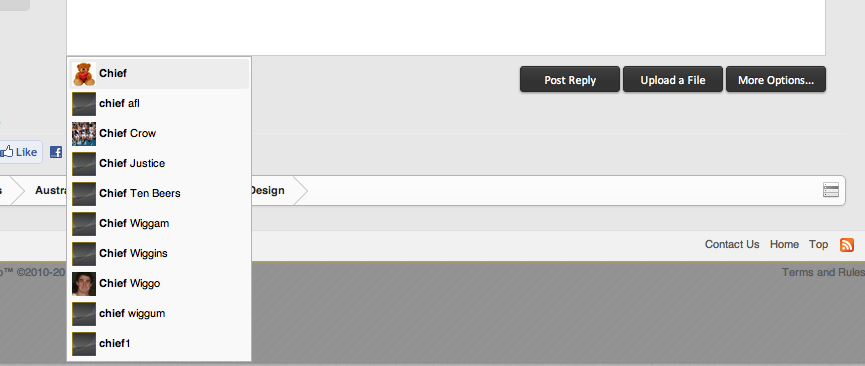
The resulting tag looks like this: Chief
One problem with tagging is if the poster has multiple words in their username. Once the user types a space after the '@' symbol, the drop-down list disappears. The best workaround for this is to wrap the username you wish to tag in
 tags.
tags.
For instance:

In these instances, it is imperative that you spell the username you wish to tag correctly, or else the BF database may tag the wrong user - or perhaps even no user at all. (NB: Doesn't matter if letters are uppercase or lowercase - thanks GG)
Hopefully these tips help you to answer an oft-asked question.
Simply place the @ symbol in front of the users name and they will be tagged.
- Chief
Tagging users is a new feature of BigFooty. It is primarily used to aware a user of a particular post or thread. The tagged user then receives an 'alert' to notify them that they have been tagged.
To tag a user, type the '@' symbol and then, without any spaces, begin typing the name of the user you wish to tag. A drop-down list of names will appear below the '@' symbol, and the list will shorten as you type more letters. To finish the tag, click on the poster's name in the dropdown list (avatars are also helpful here to identify posters with similar names).
The resulting tag looks like this: Chief
One problem with tagging is if the poster has multiple words in their username. Once the user types a space after the '@' symbol, the drop-down list disappears. The best workaround for this is to wrap the username you wish to tag in
For instance:
In these instances, it is imperative that you spell the username you wish to tag correctly, or else the BF database may tag the wrong user - or perhaps even no user at all. (NB: Doesn't matter if letters are uppercase or lowercase - thanks GG)
Hopefully these tips help you to answer an oft-asked question.
Last edited by a moderator:


