Remove this Banner Ad

PC Pc Gaming/building thread

  • Thread starter Thread starter TheKanga
  • Start date Start date
  • Tagged users Tagged users None

🥰 Love BigFooty? Join now for free.

Hi all,

I'm ready to enter the modern world and build myself a BRAND NEW PC!!!!
My last PC was built so long ago I had to replace the battery on the motherboard. I didn't even know motherboards had batteries!

My PC will be mostly audio (post-production, editing) and a little bit of video stuff too (capturing video, rather than rendering).

My PC will need:
As many HDD bays as possible (I currently have 4 internal drives, and tonnes of external drives). I archive tonnes of video/audio/(lossless) music.
A PCIe slot- are these still common on motherboards?
10 USB ports, more even.
As much RAM as possible.
DEAD SILENT (ie: silent case & cooling components).

What can I expect for max $4,000? And what is the best online parts store?
I am expecting to recycle from my current PC the 900w PSU, case and storage.

Cheers!

Edit: this PC won't be for gaming, and ideally won't be connected to the Internet either.

The limitation with hard drives (depending on the number is how many on board SATA ports you have, Most motherboards max out at 6, and if you are using on board m.2 SSD's some of this may get disabled (depending on the motherboard).

Also, exactly how much RAM "as much as possible?" You can get 32GB single sticks of RAM, which is a total of 128GB if you fill up all 4 slots (most consumer motherboards have 4 slots).

If you need more than 128GB, then you're entering Threadripper/Xeon/Epyc CPU territory and you can watch your budget disintegrate. but they can get to TB of RAM.

In any case you can probably get something decent going for.

5900X (12 core CPU)
Arctic Freezer 360mm CPU Radiator.
GPU you can get an ordinary 3060 or AMD equivelant. These are low-end/mid-tier cards. a 3080 or 6800 would be overkill unless you're doing graphics work
Cases can't really help you as I haven't looked at desktop pc cases in ages.
X570 Master Motherboard by Gigabyte has 9 USB ports.

Did I miss anything dwwaino
 
The limitation with hard drives (depending on the number is how many on board SATA ports you have, Most motherboards max out at 6, and if you are using on board m.2 SSD's some of this may get disabled (depending on the motherboard).

Also, exactly how much RAM "as much as possible?" You can get 32GB single sticks of RAM, which is a total of 128GB if you fill up all 4 slots (most consumer motherboards have 4 slots).

If you need more than 128GB, then you're entering Threadripper/Xeon/Epyc CPU territory and you can watch your budget disintegrate. but they can get to TB of RAM.

In any case you can probably get something decent going for.

5900X (12 core CPU)
Arctic Freezer 360mm CPU Radiator.
GPU you can get an ordinary 3060 or AMD equivelant. These are low-end/mid-tier cards. a 3080 or 6800 would be overkill unless you're doing graphics work
Cases can't really help you as I haven't looked at desktop pc cases in ages.
X570 Master Motherboard by Gigabyte has 9 USB ports.

Did I miss anything dwwaino

I'm just a gamer so non-gaming specs to recommend isn't my thing. On reading that the first thing I though was a 5900x and the x570 platform for the USB requirement. More pcie and sata lanes too though I haven't looked at how many the latest 12th gen Intel chipset allows. Only thing with x570 is I think it has stability issues with huge amounts of overclocked memory using DOCP? But then again this isn't a high performance machine so it shouldn't matter to leave the memory as stock. From there I'm not sure how to fill out $4k? A 3070ti would go a long way for video work but now we also just have a gaming machine lol.
 
So our youngest cat managed to topple the wife's desktop I passed down to her, and think it's pretty much cactus. (The cat was close to being cactus too after we saw it all happen in slow mo)

Thinking of just getting a basic officeworks job, but wondering if desktops providing that the motherboard is facing upwards, is it all good to have the case lying horizontally? Eg this one?

 
I'm just a gamer so non-gaming specs to recommend isn't my thing. On reading that the first thing I though was a 5900x and the x570 platform for the USB requirement. More pcie and sata lanes too though I haven't looked at how many the latest 12th gen Intel chipset allows. Only thing with x570 is I think it has stability issues with huge amounts of overclocked memory using DOCP? But then again this isn't a high performance machine so it shouldn't matter to leave the memory as stock. From there I'm not sure how to fill out $4k? A 3070ti would go a long way for video work but now we also just have a gaming machine lol.

If there's budget left Toump Ass , then you'd get more bang by going higher than 5900X, then you can for a 5950x (16 core, 32 threads). This also depends heavily on your workload, some programs work better with multiple cores and others are single threaded. (What software are you looking to use?)
 

Log in to remove this Banner Ad

If there's budget left Toump Ass , then you'd get more bang by going higher than 5900X, then you can for a 5950x (16 core, 32 threads). This also depends heavily on your workload, some programs work better with multiple cores and others are single threaded. (What software are you looking to use?)

I am using audio production software: ableton live/ cubase, but I also like doing basic video and graphics stuff.

Thanks heaps for your help!

Are there any online PC stores you can recommend? I ordered some thiings from Umart which seemed the cheapest.
 
I am using audio production software: ableton live/ cubase, but I also like doing basic video and graphics stuff.

Thanks heaps for your help!

Are there any online PC stores you can recommend? I ordered some thiings from Umart which seemed the cheapest.

Also try PC Case Gear and Scorptec for parts. Scorptec have walk in stores that can help too.

DAWs don't take much to run. I run Reaper with some VSTs like Superior Drummer and NeuralDSP amp sims with an external interface on a budget laptop. 5900x CPU would be plenty of you don't want the jump to 5950x. X570 motherboards have a poo load of USB configurations too.
 
Also try PC Case Gear and Scorptec for parts. Scorptec have walk in stores that can help too.

DAWs don't take much to run. I run Reaper with some VSTs like Superior Drummer and NeuralDSP amp sims with an external interface on a budget laptop. 5900x CPU would be plenty of you don't want the jump to 5950x. X570 motherboards have a poo load of USB configurations too.
You can make amazing stuff with just Reaper, free VSTs and a laptop. Reaper is super efficient (and cheap) as far as DAWs go.

That said, if you start messing with 24bit audio files @ 96k sample rate, have high track counts, CPU-intensive effects plug-ins, and low latency audio drivers you'll push a decent system fairly quickly.
 
You can make amazing stuff with just Reaper, free VSTs and a laptop. Reaper is super efficient (and cheap) as far as DAWs go.

That said, if you start messing with 24bit audio files @ 96k sample rate, have high track counts, CPU-intensive effects plug-ins, and low latency audio drivers you'll push a decent system fairly quickly.

That's why I reckon you should look at a 5900x minimum. Heaps of cores and backed up with heaps of RAM you shouldn't have any bottlenecks.

I pretty much only use mine to demo stuff for the boys before we jam on it, so it's only some quick drum tracks that I plug the midi in from something I make in Guitar Pro, then just a few guitars and bass. The interface does the heavy lifting in terms of the 24bit codec but the 16gb RAM starts to get a bit loaded. One of the mates is an audio engineer and he uses an even shittier laptop for the same thing when he's away from the studuo. I could use my 5900x/RTX3080 with 32gb RAM desktop but that's a finely tuned gaming machine that I keep all unnecessary software off lol.
 
That's why I reckon you should look at a 5900x minimum. Heaps of cores and backed up with heaps of RAM you shouldn't have any bottlenecks.

I pretty much only use mine to demo stuff for the boys before we jam on it, so it's only some quick drum tracks that I plug the midi in from something I make in Guitar Pro, then just a few guitars and bass. The interface does the heavy lifting in terms of the 24bit codec but the 16gb RAM starts to get a bit loaded. One of the mates is an audio engineer and he uses an even shittier laptop for the same thing when he's away from the studuo. I could use my 5900x/RTX3080 with 32gb RAM desktop but that's a finely tuned gaming machine that I keep all unnecessary software off lol.
Yeah I work as an audio engineer too. It's mind-blowing what you can do with computers now. My current i7 rig (over 10 years old) is still really good, especially as I'm using dedicated DSP cards to run certain plugins, but I need to upgrade the O/S and my software anyway, so I figure I may as well go all out and spend the money while I have it and build a PC that will last another ten years.

Then I guess I'll turn my current PC into a MAME machine and play Frogger on it :drunk:
 
Yeah I work as an audio engineer too. It's mind-blowing what you can do with computers now. My current i7 rig (over 10 years old) is still really good, especially as I'm using dedicated DSP cards to run certain plugins, but I need to upgrade the O/S and my software anyway, so I figure I may as well go all out and spend the money while I have it and build a PC that will last another ten years.

Then I guess I'll turn my current PC into a MAME machine and play Frogger on it :drunk:

Just on what you can do with computers now, from a guitarist's perspective I can't believe how far amp sims have come. They used to be OK but still sounded like an amp sim. There are some great value modelling packages like Bias FX and Helix, but for a few extra dollars I grabbed a single "archetype" from NeuralDSP a little while ago and it's indistinguishable from the real thing. I never plug in my physical valve amp, cab and pedal board anymore. I just plug into my interface and load up my NeuralDSP sim either in Reaper or standalone and chuck on some headphones. We're hoping to record an EP this year (was supposed to do it two years ago but covid put the brakes on that) and I think we're only going to track live drums and vocals. Pretty sure we're just going to do all guitars through modelling software. Also have the advantage of being able to tweak a dry track if something down the during late mixing doesn't quite sound right.
 
Just on what you can do with computers now, from a guitarist's perspective I can't believe how far amp sims have come. They used to be OK but still sounded like an amp sim. There are some great value modelling packages like Bias FX and Helix, but for a few extra dollars I grabbed a single "archetype" from NeuralDSP a little while ago and it's indistinguishable from the real thing. I never plug in my physical valve amp, cab and pedal board anymore. I just plug into my interface and load up my NeuralDSP sim either in Reaper or standalone and chuck on some headphones. We're hoping to record an EP this year (was supposed to do it two years ago but covid put the brakes on that) and I think we're only going to track live drums and vocals. Pretty sure we're just going to do all guitars through modelling software. Also have the advantage of being able to tweak a dry track if something down the during late mixing doesn't quite sound right.
Right?!?! It's amazing how far amplifier, saturation and tape sims have come. I use the UAD plugin of the Thermionic Culture Vulture (that's the distortion unit QOTSA hammered on Era Vulgaris). I paid $150 for it which is nothing when an original unit is $3,000, and it sounds unbelievable.

The UAD platform has just gone native too, Mac only but Windows is due in September.

That said, I bloody love my guitar pedals, even if they mostly just sit on a shelf :)
 
All this reminds me to pick up that bass I bought for $120 at the beginning of the pandemic and haven't touched since.

I can play an open E cord pretty good though.
 

Remove this Banner Ad

I bet you can play A, D and G equally as good.

You'd think so......

In any case the real struggle for me is keeping track of how many bars I need to play in the really long openings, I always end up hitting a note or 2 extra...

Toump Ass , we demand pics of whatever you end up getting!
 
Do you game in an unlit room? If not 😬


Same room as my current C1, mostly dark. As I previously mentioned this panel has slightly elevated blacks in HDR1000 mode which is fine for just gaming as blacks in games aren't black, and HDR gaming on an OLED is prone to black crush which has lead me to turn off HDR in some games. That coating will be absolutely unnoticeable in gaming, especially coming from an IPS. Could be an issue with HDR video but you don't buy a 21:9 gaming monitor for Netflix. My only minor concern will be text clarity with the triangular sub pixel layout, though I do 99% of my typing and reading on the 16:9 anyway. The initial cirticism of this panel before reviews was Dell's omission of an anti glare coating and it was thought it would be too reflective. Will be interesting now how the Asus et al 4K panels appear in the same light with the anti glare coating.
 
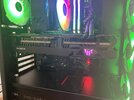
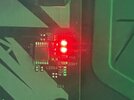
Ok Guru’s, my new pc suddenly stopped working after a few months of flawless operation. There are 2 red lights on the motherboard, Dram & CPU. None of the peripherals light up and monitor gets zero signal.

I tried changing the CR2032 battery after some internet reading but no luck. I figure the motherboard may have just packed it in but wondering if anybody has some bright ideas before I go down the internet rabbit hole.

It’s a Asrock AMD 560 Mobo.


4B946B88-CAE4-43BF-83BA-602EA056B2A4.jpeg
61B1E4B5-CF92-4E06-AABB-3C065452CCBD.jpeg
 

🥰 Love BigFooty? Join now for free.

wondering if anybody has some bright ideas before I go down the internet rabbit hole.

It’s a Asrock AMD 560 Mobo.
Try this given it seems to have been the fix for at least two people with Asrock B550 boards?
(Basically disconnect the front panel LEDS and see if that works)

Also I assume you mean B550 if its AMD. B560 is Intel
 
Try this given it seems to have been the fix for at least two people with Asrock B550 boards?
(Basically disconnect the front panel LEDS and see if that works)

Also I assume you mean B550 if its AMD. B560 is Intel

Yep, spot on with the model. I had it wrong going off memory and could read it once I’ve been playing with the plugs. I’ll give that a go.
 
If you've tried changing the CMOS battery (also unplug the cable and hit the power button a few times to drain any residual powereft) and shuffling the memory sticks in different slots, if peripherals aren't even getting power then I'd hate to say it but that could be a borked motherboard. Motherboard failures come in many different varieties from boot loops to just sitting there doing nothing. Would still try the suggested things like unplugging absolutely everything and reconnecting one by one.
 
If you've tried changing the CMOS battery (also unplug the cable and hit the power button a few times to drain any residual powereft) and shuffling the memory sticks in different slots, if peripherals aren't even getting power then I'd hate to say it but that could be a borked motherboard. Motherboard failures come in many different varieties from boot loops to just sitting there doing nothing. Would still try the suggested things like unplugging absolutely everything and reconnecting one by one.
I’ve had a decent go at this with no success. Got a bit of spare time so will have a few more goes over the next few days before I give up and go to the place a bought it. Thanks everyone for the help.
 

Remove this Banner Ad

Remove this Banner Ad

🥰 Love BigFooty? Join now for free.

Back
Top Bottom