Remove this Banner Ad

PC Pc Gaming/building thread

  • Thread starter Thread starter TheKanga
  • Start date Start date
  • Tagged users Tagged users None

🥰 Love BigFooty? Join now for free.

Wasn't planning on showing it off because it's all a bit makeshift at the moment. Hoping the bank give us the OK soon so we can start house hunting and I can rejig all this. I hate not showing off my tower.

View attachment 1403803View attachment 1403805

What monitors are those?

I may eventually upgrade from my LG 27GL850-B and cheapass $130 24" LG
 
So our youngest cat managed to topple the wife's desktop I passed down to her, and think it's pretty much cactus. (The cat was close to being cactus too after we saw it all happen in slow mo)

Thinking of just getting a basic officeworks job, but wondering if desktops providing that the motherboard is facing upwards, is it all good to have the case lying horizontally? Eg this one?


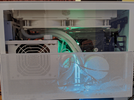
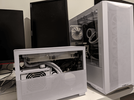
So ended up reusing the GPU, CPU and RAM and doing a Mini ITX build. Thankful it was a LianLi case with great accessibility otherwise I would have lost the plot lol.

Took a photo next to my recent build for size comparison.
 

Attachments

  • PXL_20220521_071238271.MP.png
    PXL_20220521_071238271.MP.png
    79.4 KB · Views: 31
  • PXL_20220521_071132092.png
    PXL_20220521_071132092.png
    46.9 KB · Views: 31

Log in to remove this Banner Ad

So my 4 days of solid use review of the AW3423DW.

It's everything it was hyped up to be to me. The HDR is amazing, in fact I'll say it's better than my C1 as being a Samsung panel and slightly different tech it actually achieves a higher peak brightness. The C1 is great for contrast which is typical for OLED but if I was to nitpick the one thing that bummed me about my previous B7 and now C1 is I wish they were just a tad brighter to let the highlights really pop. Watching HDR content like Netflix on the C1 it's no issue, but a few console games I actually had to disable HDR due to black crush and the bright parts not being clear enough. Since the AW3423DW is brighter it's not even an issue. There is an option for HDR400 and HDR1000. I've set it to HDR1000 like I've read everyone else do. All it does is allow peak brightness of 1000nits at a 2% window or something like that with a slightly more aggressive ABL. The ABL isn't distracting and I've so far only noticed it a couple times in Destiny opening my inventory after being in a really bright area. This is also why I installed Windows 11 just recently as I heard about its superior handling of HDR. I'm running auto HDR and HDR is just running 24/7 even on the desktop. I never experienced HDR in Windows 10 but I read many opinions that it was a bit washed out and didn't handle it well. I'm yet to try a game that doesn't support HDR but it's supposed to be like the Series X and handles it really well. So far the only games I've played are Destiny and Metro Exodus. Destiny has always been exceptionally optimised and it's pure eye candy in HDR. The different elemental explosions are colourful fireworks going off. Metro Exodus is a dreary game but things like your glowing compass and visibility indicator on your arm look like actual shining LEDs.

Is there fan noise? I don't know, I play with headphones. If there is it's quiter than my PC fans which I don't even hear because I'm wearing headphones.

Is the anti-glare coating noticeable? If you set the right conditions and look for it. Though OLEDs have never been recommended in bright environments or anywhere with direct light because they simply don't get as bright as other panel technologies. Where I game is ambient. There are downlights about 10m behind me and there are no reflections. During the day the blacks are still as deep and is actually less reflective than the C1.

Text clarity with the triangle orientation of the subpixels? When I first turned it on and got into Windows this is the first thing I looked for and spotted it. After about 10 minutes I stopped looking, forgot about it and it looks completely normal.

"ermagherd the stand is big". Yeah, it is, but so is the stand of my X34P. It's the same sized footprint, just slightly thicker feet. Seems pretty standard. If it's a problem get an arm.

I've bought expensive tech before that while I've been happy with the purchase I've felt that maybe it wasn't the best value. Not this time. This is worth every penny. For anyone else that doesn't mind dropping premium coin on premium gear I honestly recommend to do some of your own research on this monitor and give it consideration. If ultrawide isn't your thing then keep an eye out for when the Samsung QD-OLEDs start appearing in 16:9 versions. Otherwise I saw the 20% off deal is now available through the Dell website. Previously that price was only through their Ebay store with a discount code.
 
So my 4 days of solid use review of the AW3423DW.

It's everything it was hyped up to be to me. The HDR is amazing, in fact I'll say it's better than my C1 as being a Samsung panel and slightly different tech it actually achieves a higher peak brightness. The C1 is great for contrast which is typical for OLED but if I was to nitpick the one thing that bummed me about my previous B7 and now C1 is I wish they were just a tad brighter to let the highlights really pop. Watching HDR content like Netflix on the C1 it's no issue, but a few console games I actually had to disable HDR due to black crush and the bright parts not being clear enough. Since the AW3423DW is brighter it's not even an issue. There is an option for HDR400 and HDR1000. I've set it to HDR1000 like I've read everyone else do. All it does is allow peak brightness of 1000nits at a 2% window or something like that with a slightly more aggressive ABL. The ABL isn't distracting and I've so far only noticed it a couple times in Destiny opening my inventory after being in a really bright area. This is also why I installed Windows 11 just recently as I heard about its superior handling of HDR. I'm running auto HDR and HDR is just running 24/7 even on the desktop. I never experienced HDR in Windows 10 but I read many opinions that it was a bit washed out and didn't handle it well. I'm yet to try a game that doesn't support HDR but it's supposed to be like the Series X and handles it really well. So far the only games I've played are Destiny and Metro Exodus. Destiny has always been exceptionally optimised and it's pure eye candy in HDR. The different elemental explosions are colourful fireworks going off. Metro Exodus is a dreary game but things like your glowing compass and visibility indicator on your arm look like actual shining LEDs.

Is there fan noise? I don't know, I play with headphones. If there is it's quiter than my PC fans which I don't even hear because I'm wearing headphones.

Is the anti-glare coating noticeable? If you set the right conditions and look for it. Though OLEDs have never been recommended in bright environments or anywhere with direct light because they simply don't get as bright as other panel technologies. Where I game is ambient. There are downlights about 10m behind me and there are no reflections. During the day the blacks are still as deep and is actually less reflective than the C1.

Text clarity with the triangle orientation of the subpixels? When I first turned it on and got into Windows this is the first thing I looked for and spotted it. After about 10 minutes I stopped looking, forgot about it and it looks completely normal.

"ermagherd the stand is big". Yeah, it is, but so is the stand of my X34P. It's the same sized footprint, just slightly thicker feet. Seems pretty standard. If it's a problem get an arm.

I've bought expensive tech before that while I've been happy with the purchase I've felt that maybe it wasn't the best value. Not this time. This is worth every penny. For anyone else that doesn't mind dropping premium coin on premium gear I honestly recommend to do some of your own research on this monitor and give it consideration. If ultrawide isn't your thing then keep an eye out for when the Samsung QD-OLEDs start appearing in 16:9 versions. Otherwise I saw the 20% off deal is now available through the Dell website. Previously that price was only through their Ebay store with a discount code.

How do you find using it in dual display?

If I get one, I'm probably going to keep my 27" LG but with a monitor that large it may not be worth it.
 
How do you find using it in dual display?

If I get one, I'm probably going to keep my 27" LG but with a monitor that large it may not be worth it.

By dual do you mean splitting it in half? For splitting it Windows 11 is pretty friendly in that it's pretty clever at knowing when you're trying to snap windows to only half the screen. For actual productivity I wouldn't recommend it though because imo 3440*1440 isn't enough real estate and you would probably want to keep the 27". Would be better off with something like the Samsung G9 which is essentially two 27" 1440p montiors together if you wanted a dual display. 34" ultrawide physically isn't all that much bigger than 27". It's the same physical height but just a few extra inches either side.
 
Trying to decide if upgrading from a 3600X to a 5800X3D( Stupid name) is worthwile, or getting a 5950X for my server and using the 3950x as my daily driver.

here you go for benchmarks


Like everything if you can afford to do it, why not!. Clear performance jump.
 
Last edited:
here you go for benchmarks


Like everything if you can afford to do it, why not!. Clear performance jump.


I use my PC for more than just gaming, VM's are a big part of what i do day to day, so the extra cores are very appealing.
 

Remove this Banner Ad

I use my PC for more than just gaming, VM's are a big part of what i do day to day, so the extra cores are very appealing.

i just spent 2k upgrading my system.

nothing bette than an upgrade!
 

Can't post the link because of the stupid filter but you should be able to find it pretty easily.

Code:
https://mobilegamer.biz/devs-not-baking-monetisation-into-the-creative-process-are-*******-idiots-says-unitys-john-riccitiello/

If you have the chance to switch to Godot

You should.

Actually just covered this in the general thread at the top of the forum. Definitely Godot or UE now. I always liked Unity though migrated to UE as it became more indie friendly. Unity still has/had a purpose and is a good engine but **** that attitude.
 
let's talk DLSS and gsync.

so in the last few games i've bought (god of war, chernobylite and now deathloop) i'm getting minor screen tearing when using DLSS. minor because it's not blatantly obvious like regular screen tearing, and it's normally only noticeable when the camera is close to geometry in the scene. turning off DLSS fixes the problem, as does turning on vsync.

i have an LG CX TV and appreciate it's 'gsync compatible' rather than 'true' gsync (though didn't realise it at the time of purchase). i always thought gsync meant i wouldn't need to use vsync ever again? the 3080 is still a monster at native but add ray tracing at 4K and you need the extra frames. any advice/correction would be had, thanks :)
 
let's talk DLSS and gsync.

so in the last few games i've bought (god of war, chernobylite and now deathloop) i'm getting minor screen tearing when using DLSS. minor because it's not blatantly obvious like regular screen tearing, and it's normally only noticeable when the camera is close to geometry in the scene. turning off DLSS fixes the problem, as does turning on vsync.

i have an LG CX TV and appreciate it's 'gsync compatible' rather than 'true' gsync (though didn't realise it at the time of purchase). i always thought gsync meant i wouldn't need to use vsync ever again? the 3080 is still a monster at native but add ray tracing at 4K and you need the extra frames. any advice/correction would be had, thanks :)

Not sure how you've set it up but to force gsync by making sure the output stays within the panel's VRR limits then make sure vsync is left off in any game option, but go into the 3D settings of that game through the NVIDIA settings menu and enable vsync there. Without any extra info I don't know why DLSS would cause this unless it's going over the max refresh of the CX and therefore out of gsync limits.
 
Not sure how you've set it up but to force gsync by making sure the output stays within the panel's VRR limits then make sure vsync is left off in any game option, but go into the 3D settings of that game through the NVIDIA settings menu and enable vsync there. Without any extra info I don't know why DLSS would cause this unless it's going over the max refresh of the CX and therefore out of gsync limits.

hey mate, thanks for the help.

yeah, i've started using vsync via control panel, i just thought that having a gsync TV i wouldn't need vsync anymore? like what does gsync even do if vsync is being utilised at the same time?

Im not sure what other settings might be relevant - i just have gsync available under control panel for full screen and windowed modes. in-game if there's an option i might limit frames to 120 (as per the CX's maximum). though, having a look through the TV options i note that 'freesync' wasn't activated, so i will try that. cheers!
 

🥰 Love BigFooty? Join now for free.

hey mate, thanks for the help.

yeah, i've started using vsync via control panel, i just thought that having a gsync TV i wouldn't need vsync anymore? like what does gsync even do if vsync is being utilised at the same time?

Im not sure what other settings might be relevant - i just have gsync available under control panel for full screen and windowed modes. in-game if there's an option i might limit frames to 120 (as per the CX's maximum). though, having a look through the TV options i note that 'freesync' wasn't activated, so i will try that. cheers!

The more you google this the more answers you'll get and this will just be another to add to the confusion lol.

So gsync has a range. For arguments sake let's say the gsync module/capability in a panel is 60-200hz. If you have gsync and vsync enabled in the NVIDIA control panel it will automatically disable vsync in the background while in gsync range. Once you leave that range the vsync will take over. This pretty much eliminates screen tearing. If you don't have vsync enabled but saying you're getting tearing with DLSS on I'm assuming you're exceeding the gsync range.
 
Isn't "gsync compatible" just rebadged freesync (i.e there is no special gsync module)?

Yeah. We could just say VRR at this point. It doesn't change anything though. The settings are the same regardless if it's a gsync module or just gsync compatible. The only difference is the gsync modules have a wider refresh range (well they did unless that's changed in the last 12 months).
 
I’ve really jumped back into gaming on my PC lately now I have some people to play with.

Is it worth upgrading my 1060 yet?


Sent from my iPhone using BigFooty.com
 
I’ve really jumped back into gaming on my PC lately now I have some people to play with.

Is it worth upgrading my 1060 yet?


Sent from my iPhone using BigFooty.com

Is the 1060 struggling with anything you're playing?

If you're looking to upgrade to a similar tier to what the 1060 was in its time then the 3060 is currently well available and back to what I'd consider not insane prices. They're back to around the $600-$700 mark. Some cheaper and the premium and TI models around $800. With the 12gb of VRAM these will last you as long as your 1060 if you're only sticking to 1080/1440 gaming, maybe light 4K settings. If you were looking to reach a bit more I'd look at a 3060ti before a 3070. The 3080s are down to the prices they should have been all along of around $1200-1500 depending on the make and model. Only the 4090 is rumoured to release this year with the rest of the 4000 series not until next year so I don't think there will be any drastic price cuts on the 3000 for a little while longer.
 
Is the 1060 struggling with anything you're playing?

If you're looking to upgrade to a similar tier to what the 1060 was in its time then the 3060 is currently well available and back to what I'd consider not insane prices. They're back to around the $600-$700 mark. Some cheaper and the premium and TI models around $800. With the 12gb of VRAM these will last you as long as your 1060 if you're only sticking to 1080/1440 gaming, maybe light 4K settings. If you were looking to reach a bit more I'd look at a 3060ti before a 3070. The 3080s are down to the prices they should have been all along of around $1200-1500 depending on the make and model. Only the 4090 is rumoured to release this year with the rest of the 4000 series not until next year so I don't think there will be any drastic price cuts on the 3000 for a little while longer.

Not noticeably, but I’m thinking it’s a good time to start putting some money away towards one.

My monitors are only 1440p so maybe I’ll get away with a 3060.


Sent from my iPhone using BigFooty.com
 

Remove this Banner Ad

Remove this Banner Ad

🥰 Love BigFooty? Join now for free.

Back
Top Bottom