Fizzler
TAKE BACK PAFC


- Dec 26, 2013
- 13,777
- 18,858
- AFL Club
- Port Adelaide
- Other Teams
- OKC, Coburg, Werribee, Storm, QPR
Pen tool.How can you trace
Follow along with the video below to see how to install our site as a web app on your home screen.
Note: This feature may not be available in some browsers.

 BigFooty AFLW Notice Img
AFLW 2025 - AFLW Trade and Draft - All the player moves
Due to a number of factors, support for the current BigFooty mobile app has been discontinued. Your BigFooty login will no longer work on the Tapatalk or the BigFooty App - which is based on Tapatalk.
Apologies for any inconvenience. We will try to find a replacement.
Pen tool.How can you trace


Tracing something involves making a shape with the pen tool, over the top of a base image.How can you trace


Log in to remove this Banner Ad

it's pretty 'edgy', curve more rather than making more points to make it smoother.Is this alright so far GG?
it's pretty 'edgy', curve more rather than making more points to make it smoother.
very good though, keep going!

 .
.
Looks fantastic mate! Yeah, just essentially what NM_Mitchell said, curved lines look best - but it will come with practiceIs this alright so far GG?
Looks fantastic mate! Yeah, just essentially what NM_Mitchell said, curved lines look best - but it will come with practice
No worries, anytime!Thanks mate , your right about the practice. As I mentioned in my last post thanks for putting up the tut too , It's well presented and easy to follow so it won't be too difficult to finish it. BTW - I wanted to know if there are any more tutorials coming (my hope is to see something where maybe retro jumpers , from all era's gone by , lace up jumpers , retro collars and how to do laces for lace up jumpers might be done) , I'd certainly be keen to try that if it happened , or else I may eventually get good enough to attempt it myself.
I'm on holidays at the end of this week, so I'll have lots of time to help out.
.
How can you trace
Pen tool.
Tracing something involves making a shape with the pen tool, over the top of a base image.
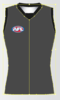
So in my instance, I used the pen tool to go over the outline of Jobe Watson's jumper and then shorts.
on a section then manipulating the handles to get a smooth curve.


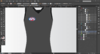
What type of line is it?how do you do remove this line?
View attachment 145981
You should probably use curves in the side. Visit bezier.method.ac to learn.how do you do remove this line?
View attachment 145981
I don't think the paths have been joined, otherwise that line shouldn't be there.a path, from when I joined them.
View attachment 145986
they are curves. Well I thought they where?You should probably use curves in the side. Visit bezier.method.ac to learn.


This is where half my dislike of Illustrator comes from. Inkscape is much more logical with this and with grids/snapping.nah just undo the join and cut the line in the middle from its anchor points
you're not supposed to close the path before duplicating and joining


I don't think I worded that right. I meant could the same steps being showed here in the tutorial, work when making a PS template? If so I'd love it if someone could show me.Would this tutorial be a similar process to making a template for PSD?
The process seems pretty compatible, you can use pen tool shapes.I don't think I worded that right. I meant could the same steps being showed here in the tutorial, work when making a PS template? If so I'd love it if someone could show me.