


BloodyRipper
Rookie
Thought I would do a bit of a half tutorial, half guide sort of thing for people interested in using illustrator and iPad’s for designing logos and jumpers. I will start with illustrator as it’s what I use 80% of the time. I will try do an iPad tutorial if I have time.
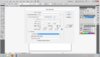
I like to work on a large square canvas when I’m designing, around 1500 px, 300ppi and CMYK Colour Mode.
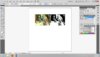
The next thing I do is load up some reference images, or sketches depending on what I am working on. For this example I will use a couple of versions of a side profile view of a kangaroo. I will have these on a separate layer so I can lock it and draw on another.
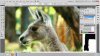
The next thing I do is block out a base shape. When I’m working initially I do everything in shades of grey and then work out colours after. Finding a good base shape is really up to your personal taste, whether you are going to use the whole subject, chop it at the neck, put it on a shield, its up to you. Play around with different ideas. Start mocking it up using an outline then make it a block colour and tweak it.
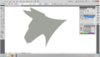
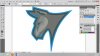
I then make a duplicate of this and move it some wheresafe out of the way. I then make the logo outline. This is done by offsetting the path. (Object> Path> Offset Path)
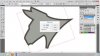
If you have sharp points or corners you may need to touch them up as illustrator can sometimes get confused.
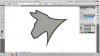
Now I start playing around with details, shading, features and a little bit of colour to start getting an idea of where the idea is going. After doing this I get to a stage where I decide whether or not I like the design or want to scratch it and completely start again. I start laying in a block layer of shading. If I feel it needs changing I tweak it a bit more. In this case I tweaked the jaw a bit. The easiest way I find to draw all of these things is in little pieces, then combine them together using the Unite function in the Path Finder tool box. This can also be used to subtract and split objects from each other. It took me a while to work out where it actually is. You can bring it up by going Window > Pathfinder or Shift+Ctrl+9.
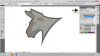
Next I start laying in some darker details and highlights using the same process. A lot of people ask me how I work out how to work out what’s what in terms of blocking light dark and mid tones, to be honest, its all about stuffing around and making use of your references, and imagining light and dark areas on the surface of whatever your designing. The hardest part in doing this in a sports logo is trying to do it in a way that makes the logo seem impressive, dominant and powerful.
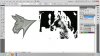
So now I have something I am relatively happy with I will start playing around with colour schemes. All the while I am continuously tweaking the design. After stuffing around a bit I ended up with this.
Nothing outstanding but its not too shitty. The final step of the process is presenting your design. By adding a drop shadow, and a gradient background you can quickly and simply give your design a nice finish. Try to pick a radial gradient that relates to a main colour in your design.

I don’t know if this was of any use, or help at all to anyone but maybe you found something useful in here. Hopefully it was. I will try do an iPad tutorial when I have some spare time. Would be great to see your designs if this inspires anyone. Or if anyone has any questions.
I like to work on a large square canvas when I’m designing, around 1500 px, 300ppi and CMYK Colour Mode.
The next thing I do is load up some reference images, or sketches depending on what I am working on. For this example I will use a couple of versions of a side profile view of a kangaroo. I will have these on a separate layer so I can lock it and draw on another.
The next thing I do is block out a base shape. When I’m working initially I do everything in shades of grey and then work out colours after. Finding a good base shape is really up to your personal taste, whether you are going to use the whole subject, chop it at the neck, put it on a shield, its up to you. Play around with different ideas. Start mocking it up using an outline then make it a block colour and tweak it.
I then make a duplicate of this and move it some wheresafe out of the way. I then make the logo outline. This is done by offsetting the path. (Object> Path> Offset Path)
If you have sharp points or corners you may need to touch them up as illustrator can sometimes get confused.
Now I start playing around with details, shading, features and a little bit of colour to start getting an idea of where the idea is going. After doing this I get to a stage where I decide whether or not I like the design or want to scratch it and completely start again. I start laying in a block layer of shading. If I feel it needs changing I tweak it a bit more. In this case I tweaked the jaw a bit. The easiest way I find to draw all of these things is in little pieces, then combine them together using the Unite function in the Path Finder tool box. This can also be used to subtract and split objects from each other. It took me a while to work out where it actually is. You can bring it up by going Window > Pathfinder or Shift+Ctrl+9.
Next I start laying in some darker details and highlights using the same process. A lot of people ask me how I work out how to work out what’s what in terms of blocking light dark and mid tones, to be honest, its all about stuffing around and making use of your references, and imagining light and dark areas on the surface of whatever your designing. The hardest part in doing this in a sports logo is trying to do it in a way that makes the logo seem impressive, dominant and powerful.
So now I have something I am relatively happy with I will start playing around with colour schemes. All the while I am continuously tweaking the design. After stuffing around a bit I ended up with this.
Nothing outstanding but its not too shitty. The final step of the process is presenting your design. By adding a drop shadow, and a gradient background you can quickly and simply give your design a nice finish. Try to pick a radial gradient that relates to a main colour in your design.
I don’t know if this was of any use, or help at all to anyone but maybe you found something useful in here. Hopefully it was. I will try do an iPad tutorial when I have some spare time. Would be great to see your designs if this inspires anyone. Or if anyone has any questions.


