Remove this Banner Ad

PC Pc Gaming/building thread

🥰 Love BigFooty? Join now for free.

Cleaned out my PC and it would not turn back on, had it checked out and was told a new mobo would be needed. Working myself up for days that I had not grounded myself properly and had gotten static into it. Then today he messages me again and says it was just bent CPU pins which are now fixed. Didn't notice any when checking myself but not having to pay 300+ for a new mobo is a relief...
 
Cleaned out my PC and it would not turn back on, had it checked out and was told a new mobo would be needed. Working myself up for days that I had not grounded myself properly and had gotten static into it. Then today he messages me again and says it was just bent CPU pins which are now fixed. Didn't notice any when checking myself but not having to pay 300+ for a new mobo is a relief...

I've done this and had to toss the motherboard. It was a sad day, entirely my fault and I've been paranoid installing CPUs ever since. Now I install them with the same sort of caution I imagine it takes it defuse a bomb.
 
At one point I was going to get one of those magnifying glass head gears, to inspect pins like those tiny CPU ones. Wouldn’t be a bad investment

Like this?

Got this off Amazon, pretty happy with it.


Log in to remove this Banner Ad

Like this?

Got this off Amazon, pretty happy with it.


Yeah. As long as it didn’t feel heavier than it sounds listed compared to actually on your head.

LED on that one is a good idea too.
 
Yeah. As long as it didn’t feel heavier than it sounds listed compared to actually on your head.

LED on that one is a good idea too.

Yeah it's light, doesn't feel like it's dragging your head down at all. Was actually surprised as was expecting el cheapo Amazon junk.
 
I've done this and had to toss the motherboard. It was a sad day, entirely my fault and I've been paranoid installing CPUs ever since. Now I install them with the same sort of caution I imagine it takes it defuse a bomb.


So I finally decided to fire it up today and it worked fine. The repair guy who fixed the bent pins pig tailed my 3080 though as well as put all the front panel connectors back in the wrong place. Noticed when my power button was flashing randomly. He had connected it to the hdd led. Was reading it's a harmless enough issue that won't cause any damage but having to take shit apart again is exhausting after the issues I have been having.
 
So I've ordered parts for my new build.

CPU: R9 9800X3D - $625
Mobo: B850 Gigabyte Gaming X - $303
GPU: XFX Swift 9070 XT - $999
RAM: Klevv Fit V 2x16GB DDR5 6000 CL28 - $200
PSU: Corsair RM850X (already own)
SSD: 1TB Teamgroup MP44Q - $95
Case: Lancool 207 (Black) - $124

I probably would have gone the 7800X3D but I found a decent sale on the 9800X3D. I was also tempted to get a 5070Ti but the 9070 XT falling below $1000 was too tempting. I didn't think the 5070 Ti was worth an extra $250. It might all be moot anyway. If 24Gb GPUs are released next year, I will sell the 9070 XT second hand.

The only thing I'm peeved about is the RAM cost. I just couldn't find any decently priced CL30 kits and the CL36 kits were only 20-30 bucks cheaper so I ended up just forking out extra for CL28.

Will post a pic when it's done.
 
Last edited:
So I've ordered parts for my new build.

CPU: R9 9800X3D - $625
Mobo: B850 Gigabyte Gaming X - $303
GPU: XFX Swift 9070 XT - $999
RAM: Klevv Fit V 2x16GB DDR5 6000 CL28 - $200
PSU: Corsair RM850X (already own)
SSD: 1TB Teamgroup MP44Q - $95
Case: Lancool 207 (Black) - $124

I probably would have gone the 7800X3D but I found a decent sale on the 9800X3D. I was also tempted to get a 5070Ti but the 9070 XT falling below $1000 was too tempting. I didn't think the 5070 Ti was worth an extra $250. It might all be moot anyway. If 24Gb GPUs are released next year, I will sell the 9070 XT second hand.

The only thing I'm peeved about is the RAM cost. I just couldn't find any decently priced CL30 kits and the CL36 kits were only 20-30 bucks cheaper so I ended up just forking out extra for CL28.

Will post a pic when it's done.

That's a good price for the 9800x3d. It cools better than the 7800x3d too. I don't think that price for memory is too bad really, not for a cl28 kit anyway. I bought my 2x16 6000cl30 kit for maybe only a bit less than that about 12 months ago as cl30 was the sweet spot price to perf and cl28 wasn't as readily available. I read that memory prices went up a little while ago but that's still nothing too bad.
 

Remove this Banner Ad

It sucks having a MOBO that only supports DDR4 RAM and wanting to upgrade from 16GB to 32GB since the upgrade to Windows 11 is using up way more memory than Windows 10 did but no campaigner has DDR4 RAM and those that do are way more than I am wanting to pay.
 
Anyone has experience with wifi extenders with mesh mode?

Finally got FTTP yesterday, but the PC that is going to benefit the most is in another room and not reaching the cap. Wondering if it's worth trying to squeeze a bit more and using it + an ethernet cable.
 
Anyone has experience with wifi extenders with mesh mode?

Finally got FTTP yesterday, but the PC that is going to benefit the most is in another room and not reaching the cap. Wondering if it's worth trying to squeeze a bit more and using it + an ethernet cable.

Did you get a new router and put in new cables with the upgrade? Just checking because since Australia has been so behind in internet speeds until recently most people haven't had to think twice about router speeds and ethernet cable cat types. I think most modern routers are good for at least 1gbps but make sure you aren't running any old cat 5 cables and worth checking before investing in any extenders or anything. If that's all good and you aren't hitting your cap over wifi then just try the speed test a few more times and from different servers as you might hit it. Networking is a little beyond me but I noticed that on my own network while my wired PC can hit the 750mbps cap instantly if I test anything via wifi there is a ramp up period and often won't hit the cap. I did look into this once and apparently it's normal and can be changed by router settings but since it's not broken I haven't touched it.
 
Did you get a new router and put in new cables with the upgrade? Just checking because since Australia has been so behind in internet speeds until recently most people haven't had to think twice about router speeds and ethernet cable cat types. I think most modern routers are good for at least 1gbps but make sure you aren't running any old cat 5 cables and worth checking before investing in any extenders or anything. If that's all good and you aren't hitting your cap over wifi then just try the speed test a few more times and from different servers as you might hit it. Networking is a little beyond me but I noticed that on my own network while my wired PC can hit the 750mbps cap instantly if I test anything via wifi there is a ramp up period and often won't hit the cap. I did look into this once and apparently it's normal and can be changed by router settings but since it's not broken I haven't touched it.

Got an Archer AX73 in prep for the upgrade that comes with a Cat 5e which reading seems all good for 1Gbps speeds. (Signed up for 500/50 with Aussie)

Was kinda crazy (to me at least) that the antennas coming from the PC made a 200mbs difference (so dumb I didn't check this first)

Might try and test on different servers though, cheers mate.

I should be more than happy with about 350 but you know how it is, wanna get the max lol.
 
Got an Archer AX73 in prep for the upgrade that comes with a Cat 5e which reading seems all good for 1Gbps speeds. (Signed up for 500/50 with Aussie)

Was kinda crazy (to me at least) that the antennas coming from the PC made a 200mbs difference (so dumb I didn't check this first)

Might try and test on different servers though, cheers mate.

I should be more than happy with about 350 but you know how it is, wanna get the max lol.

Actually back down to 150s, might grab some extenders tomorrow.
 

🥰 Love BigFooty? Join now for free.

Anyone has experience with wifi extenders with mesh mode?
They're fine for normal browsing/streaming but horrific for gaming.

I would get massive ping spikes with them. Ping would be stable around 50-60 99% of the time (standard for Perth), but every few minutes it would spike to well over 1000 for a few seconds and then come good.

After doing some research it turns out that every time the mesh satellite talks to the main modem, you get a big ol' ping spike.

I ended up paying to get the modem moved into my games room so I can run LAN into my PC and use the mesh satellites for the rest of the house.
 
They're fine for normal browsing/streaming but horrific for gaming.

I would get massive ping spikes with them. Ping would be stable around 50-60 99% of the time (standard for Perth), but every few minutes it would spike to well over 1000 for a few seconds and then come good.

After doing some research it turns out that every time the mesh satellite talks to the main modem, you get a big ol' ping spike.

I ended up paying to get the modem moved into my games room so I can run LAN into my PC and use the mesh satellites for the rest of the house.

Thanks for the detailed info. Got a TP Link AX3000 RE715X that im picking up from JB that I got a good price on.

This is what I get at the moment via Wifi at the opposite corner of our unit. If I get consistent big spikes, then I'll just treat the extender as a downloader as I'm juggling installing my backlog of games anyway. Can always switch back to wifi if need be. Not really playing much multiplayer intensive stuff anymore outside of MSFS.


1761426398630.png
 
I have one of these next to my gaming PC, which acts as a WiFi extender for this side of the house and it's got an ethernet cable that goes out into my PC https://www.tp-link.com/au/home-networking/range-extender/re900xd/ I don't think using the ethernet actually gives any benefit but it feels better for my brain

I've used it for a couple years with FTTP and now vision network (gfast I think?) in my new place. it gets the full speed like used to get around 700mbps on the FTTP when I used the Superloop speedboost, and it gets 400-500 on this vision network. gaming is no issue, have like 12 ping most of the time and never any dropouts

I always thought I'd end up really wanting to run ethernet around the house but now I just haven't thought about it much since this setup never has any issues
 
Thanks for the detailed info. Got a TP Link AX3000 RE715X that im picking up from JB that I got a good price on.

This is what I get at the moment via Wifi at the opposite corner of our unit. If I get consistent big spikes, then I'll just treat the extender as a downloader as I'm juggling installing my backlog of games anyway. Can always switch back to wifi if need be. Not really playing much multiplayer intensive stuff anymore outside of MSFS.

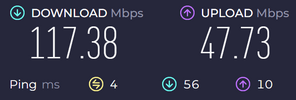
Just as an update with the the extender I got, this updated speed with CAT6 cable plugged into the extender from the PC.

1000002556.jpg

Also did a recurring ping test of 500 in cmd and got highest ping of 17 with an average of 5 and no packet loss. Pretty happy with that.

Def worth getting in the end.
 

Remove this Banner Ad

PC Pc Gaming/building thread

🥰 Love BigFooty? Join now for free.

Back
Top